Datetime data type in SQL Server 2000 or SQL Server 2005 provides a way to store data in date and time format. This type of variable or field contains both date and time togather, but sometimes we need either date or time portion only separately. For that purpose we can use Transact SQL. In this article I'll explain the way we can process datetime type data and get date and time parts as string.
We'll use some variations of Convert function to get both date and time. Let say we have an AddressBook table in our database which contains an UpdateDateTime field.
First of all we'll get only the time part of this datetime field:
SELECT CONVERT(CHAR(8),UpdateDateTime,8) FROM AddressBook
Above statement will give you the time part in string or text format like 15:13:03, Sowe can use it accordingly.
Following four Transact SQL statements return date part in different formats using Convert funciton:
--Date Part 10-26-2007
SELECT CONVERT(CHAR(10),UpdateDateTime,110) FROM AddressBook
--Date Part 2007/10/26
SELECT CONVERT(CHAR(10),UpdateDateTime,111) FROM AddressBook
--Date Part 20071026
SELECT CONVERT(CHAR(10),UpdateDateTime,112) FROM AddressBook
--Date Part 26 Oct 2007
SELECT CONVERT(CHAR(11),UpdateDateTime,113) FROM AddressBook
The date format returned is given as comments above the statements.
Showing posts with label SQL Server 2005. Show all posts
Showing posts with label SQL Server 2005. Show all posts
Friday, February 08, 2008


Wednesday, January 23, 2008
Custom paging in SQL Server stored procedure
Microsoft.net provides controls which have paging capability by default – that is they have built in feature that can let you apply data paging by just setting a few properties or with just a few lines of code. The problem with this approach is that all the data is cashed in the memory i.e. using dataset etc, which effects application performance. Custom data paging in SQL Server stored procedure is a solution to this problem. I’ll explain how to perform this in such a way that you can use it either in SQL Server 2000 or SQL Server 2005 or even later versions.
You need to pass three parameters to the stored procedure which are page number, page size, and sort order. Following stored procedure code will return a page at a particular page number with your specified page size, sorted in your specified order i.e. Asc or Desc.
First of all, pass following three parameter to the stored procedure:
@PageNumber Int,
@PageSize Int,
@SortOrder Varchar(10) = 'DESC'
We have to apply this custom data paging on Article table. First create a temporary table in stored procedure.
Declare @TempTable Table
(
TempID int Identity,
ArticleID Int
)
Following code snippet will help you sort the data in your required order and keep it in temp table.
if @SortOrder='DESC'
Begin
Insert Into @TempTable (ArticleID)
Select ArticleID
From Article
Where StatusID=1
Order By
ArticleID Desc
End
Else
Begin
Insert Into @TempTable (ArticleID)
Select ArticleID
From Article
Where StatusID=1
Order By ArticleID Asc
End
The reason to keep the data in temporary table first is just to attach a unique id in a sequence to help get a proper page from the table. As, in your actually table some records might have been removed, so if you would apply paging directly on Article table, it might not return proper set or records for a particular page.
Following two local variables will help you get the proper page.
Declare @StartIndex Int
Declare @EndIndex Int
You can perform custom paging using either 1 based or 0 based index. The formulas for both approaches are as under. You can use any one of your choice.
--If page number is 1 based
Set @StartIndex = ((@PageNumber-1)* @PageSize) +1
Set @EndIndex = @PageNumber * @PageSize
--if page number is 0 bases then
Set @StartIndex = (@PageNumber * @PageSize) + 1
Set @EndIndex = @PageSize * (@PageNumber + 1)
Now, just perform a join of Article and TempTable and get all the records between StartIndex, and EndIndex.
Select E.* From Article E
Inner Join @TempTable T
On E.ArticleID= T.ArticleID
Where T.TempID Between @StartIndex And @EndIndex
You need to pass three parameters to the stored procedure which are page number, page size, and sort order. Following stored procedure code will return a page at a particular page number with your specified page size, sorted in your specified order i.e. Asc or Desc.
First of all, pass following three parameter to the stored procedure:
@PageNumber Int,
@PageSize Int,
@SortOrder Varchar(10) = 'DESC'
We have to apply this custom data paging on Article table. First create a temporary table in stored procedure.
Declare @TempTable Table
(
TempID int Identity,
ArticleID Int
)
Following code snippet will help you sort the data in your required order and keep it in temp table.
if @SortOrder='DESC'
Begin
Insert Into @TempTable (ArticleID)
Select ArticleID
From Article
Where StatusID=1
Order By
ArticleID Desc
End
Else
Begin
Insert Into @TempTable (ArticleID)
Select ArticleID
From Article
Where StatusID=1
Order By ArticleID Asc
End
The reason to keep the data in temporary table first is just to attach a unique id in a sequence to help get a proper page from the table. As, in your actually table some records might have been removed, so if you would apply paging directly on Article table, it might not return proper set or records for a particular page.
Following two local variables will help you get the proper page.
Declare @StartIndex Int
Declare @EndIndex Int
You can perform custom paging using either 1 based or 0 based index. The formulas for both approaches are as under. You can use any one of your choice.
--If page number is 1 based
Set @StartIndex = ((@PageNumber-1)* @PageSize) +1
Set @EndIndex = @PageNumber * @PageSize
--if page number is 0 bases then
Set @StartIndex = (@PageNumber * @PageSize) + 1
Set @EndIndex = @PageSize * (@PageNumber + 1)
Now, just perform a join of Article and TempTable and get all the records between StartIndex, and EndIndex.
Select E.* From Article E
Inner Join @TempTable T
On E.ArticleID= T.ArticleID
Where T.TempID Between @StartIndex And @EndIndex
Monday, February 06, 2006
Start and Stop Windows Services using Visual Basic 2005
Start and Stop Windows Services using Visual Basic 2005
Different windows services are used to perform different operations on Windows operating system family. These services may include database services, email services or a lot of other. So, while performing automated tasks we need to start and stop these services programmatically. Here, I’ll show you how to perform this task in Visual Basic 2005.
Go to Control Panel and then Administrative Tools and Open Services Tool. Here you can find all the windows services running at your system. For example, you want to stop and start Microsoft SQL Server Service. First of all find out the name of the service from the services tool.
Name of the Microsoft SQL Server Service
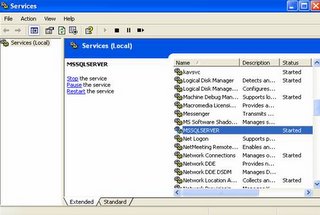
Its name is MSSQLSERVER. We’ll use this name to start and stop the service.
Create a Visual Basic.Net Windows Application project in Visual Studio 2005.
The Namespace we are going to use in this article is System.ServiceProcess.
So, import this namespace in your Visual Basic.Net project. Create an object of ServiceController class of this namespace. While creating this object you’ll have to provide the service name as parameter.
Dim objController As New ServiceController("MSSQLSERVER")
You’ll have to find the status of the service before you stop it. So, check if the status of this service is running then call stop method on this service.
If objController.Status = ServiceControllerStatus.Running Then
objController.Stop()
End If
You can give some delay so that you’ll be able to view the result of these statements.
System.Threading.Thread.Sleep(5000)
Here we have given delay of five seconds. Now, you can start your service again with the Start method of Service controller class.
But remember, check the status again and if the service has already been stopped then start it again otherwise you’ll be caught by an exception.
If objController.Status = ServiceControllerStatus.Stopped Then
objController.Start()
End If
Different windows services are used to perform different operations on Windows operating system family. These services may include database services, email services or a lot of other. So, while performing automated tasks we need to start and stop these services programmatically. Here, I’ll show you how to perform this task in Visual Basic 2005.
Go to Control Panel and then Administrative Tools and Open Services Tool. Here you can find all the windows services running at your system. For example, you want to stop and start Microsoft SQL Server Service. First of all find out the name of the service from the services tool.
Name of the Microsoft SQL Server Service

Its name is MSSQLSERVER. We’ll use this name to start and stop the service.
Create a Visual Basic.Net Windows Application project in Visual Studio 2005.
The Namespace we are going to use in this article is System.ServiceProcess.
So, import this namespace in your Visual Basic.Net project. Create an object of ServiceController class of this namespace. While creating this object you’ll have to provide the service name as parameter.
Dim objController As New ServiceController("MSSQLSERVER")
You’ll have to find the status of the service before you stop it. So, check if the status of this service is running then call stop method on this service.
If objController.Status = ServiceControllerStatus.Running Then
objController.Stop()
End If
You can give some delay so that you’ll be able to view the result of these statements.
System.Threading.Thread.Sleep(5000)
Here we have given delay of five seconds. Now, you can start your service again with the Start method of Service controller class.
But remember, check the status again and if the service has already been stopped then start it again otherwise you’ll be caught by an exception.
If objController.Status = ServiceControllerStatus.Stopped Then
objController.Start()
End If
Subscribe to:
Posts (Atom)